
How to tell if an image is AI generated: what the file can prove
If you want to know how to tell if an image is AI generated, start with what the file says about itself, before you look at hands or text. Many AI tools now add a signed label called Content Credentials, and real cameras leave detailed camera data. When both are missing, the honest answer is “can’t tell”, and that’s exactly when detector scores mislead people.
Start with the file: three things it can show
Every image file carries metadata, information stored alongside the pixels. For judging whether a picture is real, three kinds matter.
1. Content Credentials (C2PA). An open standard from the Coalition for Content Provenance and Authenticity, backed by Adobe, Microsoft, Google, OpenAI and camera makers. A credential is a signed record of where an image came from and what was done to it. Signed means tamper-evident: if the file is changed afterwards, the signature no longer matches. You can inspect one for free with the Content Credentials Verify tool.
2. The digital source type. A standard label from the photo industry body IPTC that says how an image was made. The value for AI images is “trainedAlgorithmicMedia”, defined in the IPTC digital source type list. AI tools often write it inside their Content Credentials or in the regular metadata.
3. Camera data. Real cameras record their make and model, lens, exposure settings and a private block of maker notes, which can include details such as the camera’s shutter count. AI generators don’t produce this kind of detail on their own.
What each result means: says AI, says camera, can’t tell
Put those three together and any file lands in one of three groups. Click one to see what it means:
Says AI the file declares it
Either one is enough. Means: the maker labelled it as AI. Strong evidence, especially if the credential validates.
Says camera capture details
Means: consistent with a real camera. Plain EXIF can be copied or faked; a valid signed credential is far stronger.
Can’t tell the file is silent
Means: screenshots, re-saves and most social apps end up here. It is not evidence either way.
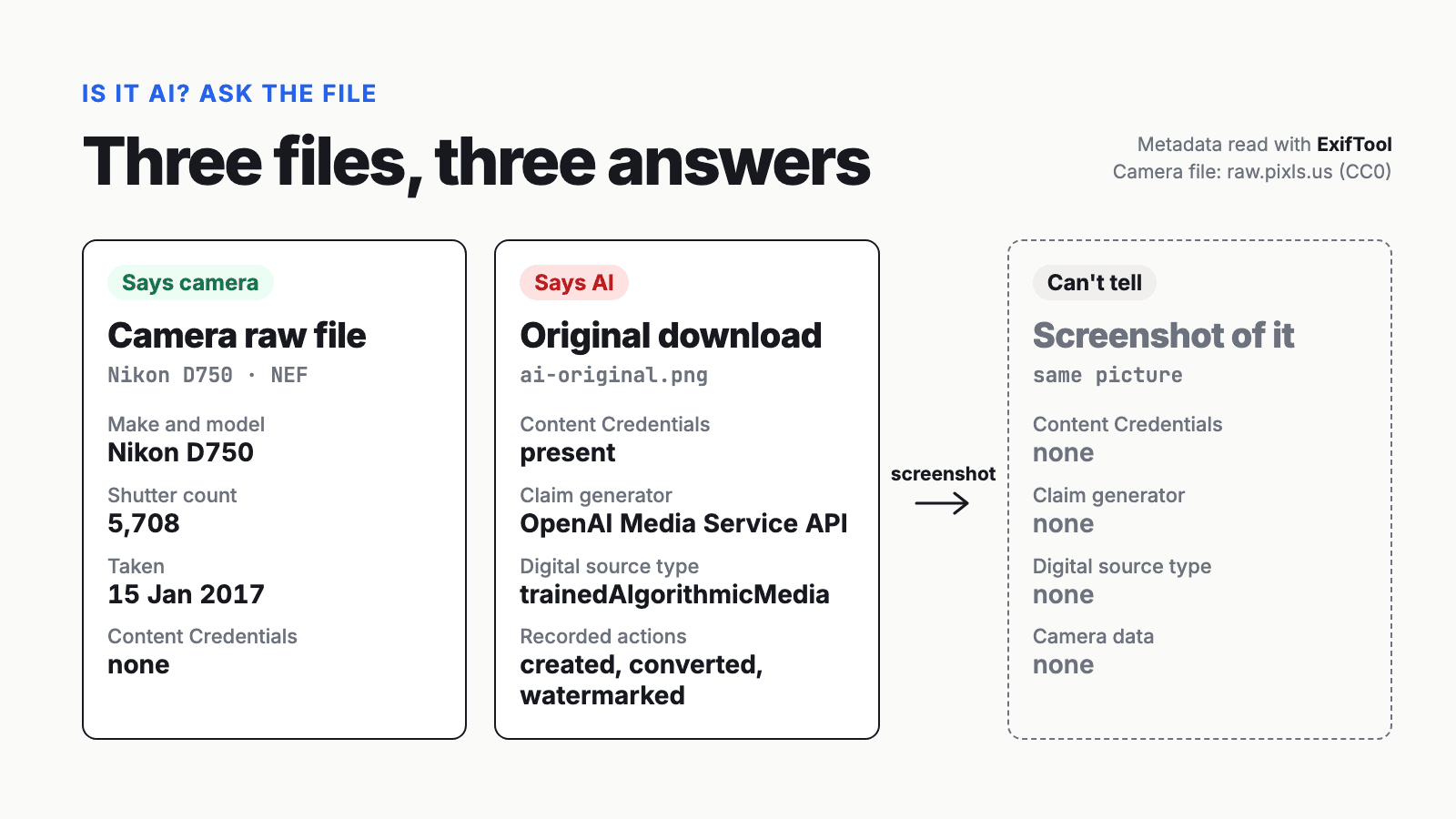
Says AI. We generated an image of a sleeping cat for this article with an AI image model on Higgsfield and read the downloaded file with ExifTool. It carried Content Credentials whose claim generator was “OpenAI Media Service API”, with the digital source type set to trainedAlgorithmicMedia and the recorded actions “created”, “converted” and “watermarked”. The file plainly declares itself as AI.
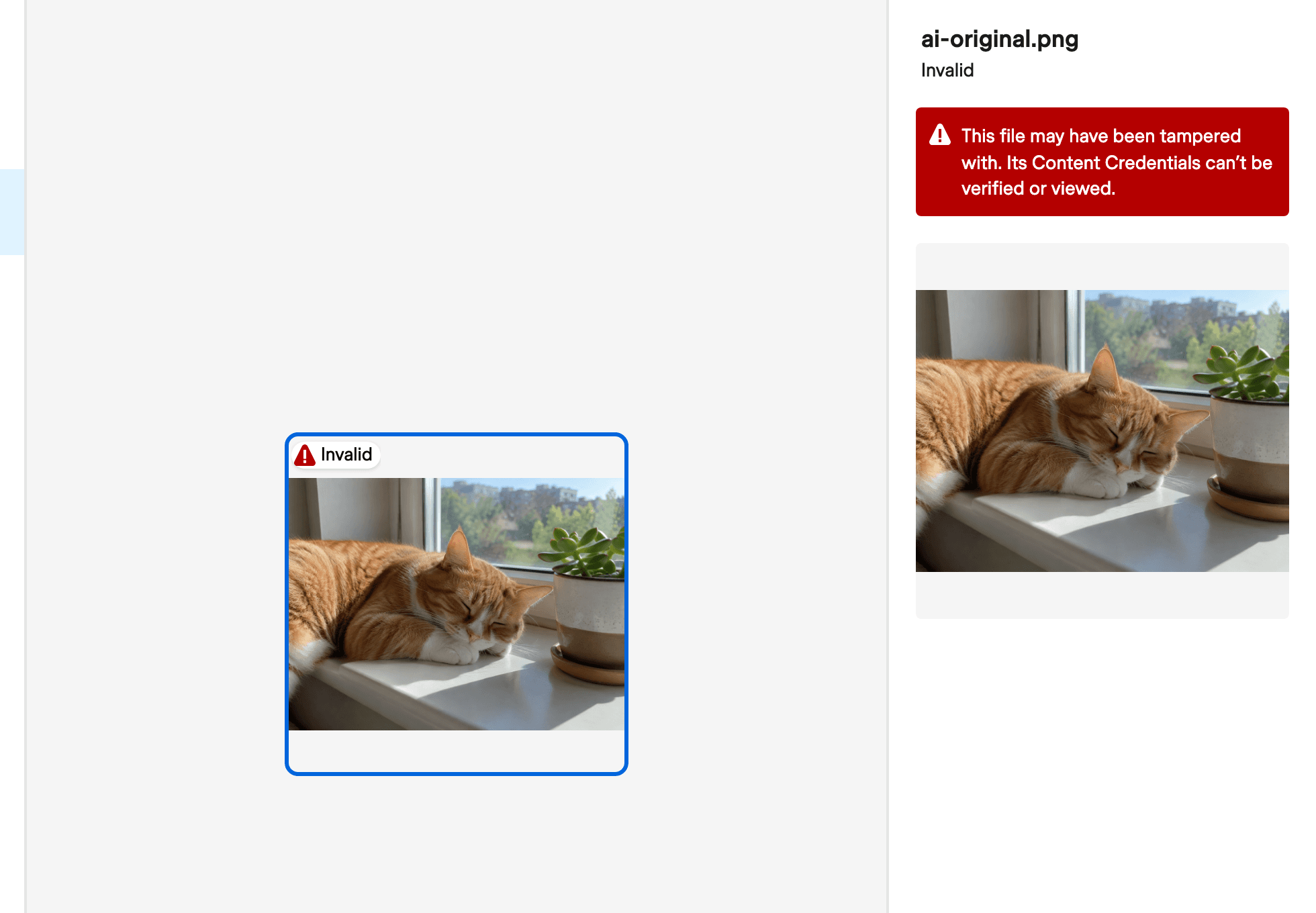
There was a twist. When we opened the same untouched download in Content Credentials Verify, the tool marked the credential “Invalid” and warned that the file may have been tampered with. We hadn’t edited it, and Verify doesn’t say which step changed it. The AI label was still readable, but the signature that makes it trustworthy no longer held.
Says camera. An original raw file from a Nikon D750 is the opposite case: make and model, firmware version, the date, and Nikon’s maker notes with a shutter count of 5,708.
- Make
- Nikon
- Model
- D750
- Firmware
- Ver.1.10
- Taken
- 15 Jan 2017
- Shutter count
- 5,708
- File number
- 5,045
- Serial number
- 60257…
- Format
- NEF, 12-bit
- Pixels
- 6032 × 4032
- File size
- 20.1 MB
- Embedded JPEG
- yes
- Credentials
- none
What a real camera file carries. Sample file: raw.pixls.us (CC0), serial number shortened. Our shutter count checker reads the same maker notes from your own photos.
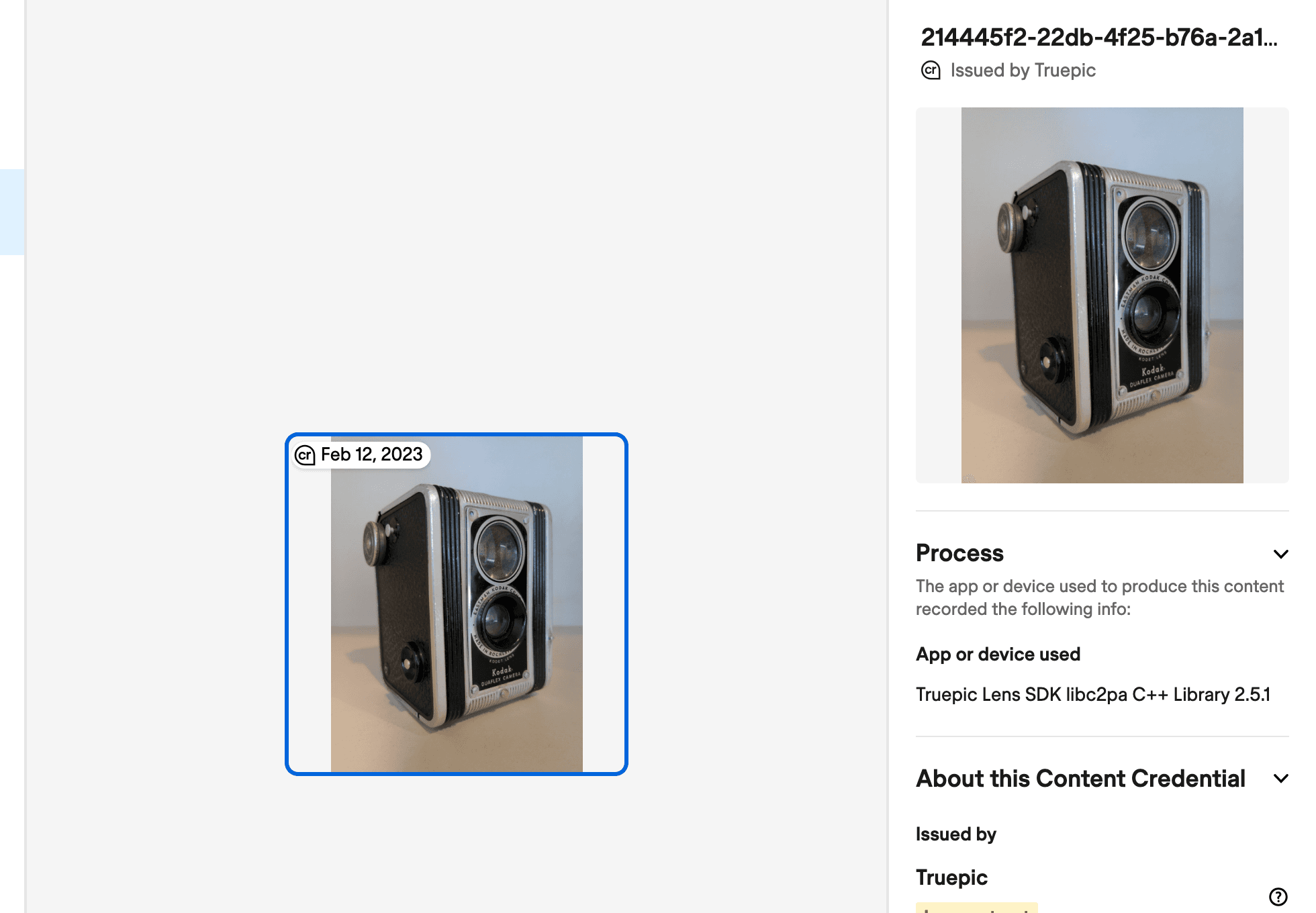
Plain camera data supports a real photo but doesn’t prove it, because metadata can be copied from one file to another. The strongest version is a credential signed by the camera itself, which some newer cameras and apps can add. Here’s one of the C2PA project’s public test images, captured with a signing app, in Verify:
Edit history is a separate kind of clue. A photo edited in Lightroom often keeps its develop settings, which our preset extractor reads. That shows the file went through an editor; it says nothing about whether the scene was real.
Can’t tell. No credentials, no AI tag, no camera data. This is the most common result by far, and it isn’t evidence either way.
Why the proof disappears
Here’s what happened when we took a screenshot of our AI cat image, and when we re-saved the original as a JPEG. Click a copy to see what’s left in the file:
Original download says AI
Screenshot of it can’t tell
JPEG re-save of it can’t tell
Same picture, different files: neither copy kept any of the original’s labels. Read with ExifTool 13.00 on 22 October 2026.
Both copies lost everything: no credentials, no AI source type, nothing to read. The picture looked identical, but the file was silent. The same happens when most social apps compress an upload, when an image is cropped and exported in many editors, or when someone simply photographs a screen. The image you’re judging has often been through one of these steps.
That’s why “can’t tell” must stay an honest answer. Missing labels are not a sign that an image is real. Some AI tools also hide an invisible watermark in the pixels. Google’s SynthID is designed to survive cropping, filters and lossy compression, and Google’s SynthID Detector, open to everyone, checks a file for it.
Why AI detectors flag real photos
AI image detectors don’t read the file’s history. They look at the pixels and estimate how likely the picture is to come from a generator, based on patterns learned from training examples. That’s a guess, and it’s presented as a percentage that looks more certain than it is.
In May 2026, the news-rating company NewsGuard tested five popular AI image detectors on 15 authentic news photos. Three of the five labelled at least one real photo as AI generated, and the worst called 6 of the 15 real photos fake. Across all five, about 13% of the verdicts on real photos were wrong.
A detector score can be a reason to look closer. It isn’t proof, and it shouldn’t be the reason anyone is accused of faking a photo.
Visual clues still worth a look
Eyes still help, as long as you know their limits:
- Hands and teeth. Extra or merged fingers were a classic giveaway. Newer models get them right most of the time.
- Text. Signs, labels and logos with garbled letters are a strong hint, but current models often write clean text.
- Reflections and shadows. Mirrors, windows and water that don’t match the scene, or shadows falling in different directions.
- Background details. Repeating patterns, melting railings, faces in a crowd that don’t hold together on a close look.
Each of these can also come from heavy editing or compression, and a good AI image may show none of them.
What to do when you still can’t tell
- Find the original. Look for the earliest and highest-quality copy. Originals are far more likely to keep their Content Credentials or camera data.
- Run a reverse image search. It can show where the image first appeared and whether it’s been used before in another context.
- Ask the person who posted it. A photographer can usually supply the original file, more shots from the same moment, or the place it was taken. If they share the original, you can even check where the photo was taken from its GPS data.
- Check trusted sources. For news events, see whether established outlets have published the same image with a photographer’s credit.
Asking for a raw camera file is a strong test when you can: a raw format such as DNG or NEF holds the sensor’s data and is much harder to fake than a JPEG.
Frequently asked questions
Can metadata prove an image is real?
Ordinary metadata can’t, because it can be copied or edited. A camera-signed Content Credential that validates is much stronger evidence, and an original raw file is harder to fake than a JPEG.
Do AI image generators add a watermark or label?
Many do. Several major tools add Content Credentials that name the AI tool and the source type, and some also add an invisible watermark in the pixels. Screenshots and re-saves usually remove the credentials, and not every tool adds them.
Are AI image detectors accurate?
Not reliably enough to treat as proof. In a May 2026 NewsGuard test, three of five popular detectors called at least one authentic news photo AI generated, and the worst got 6 of 15 real photos wrong.
Does a screenshot remove Content Credentials?
Yes. In our test, a screenshot of an AI image with Content Credentials kept no credentials, no AI source type and no other metadata. Re-saving it as a JPEG had the same effect.
What is C2PA?
C2PA, the Coalition for Content Provenance and Authenticity, is the group behind the Content Credentials standard: a signed, tamper-evident record of where an image came from and how it was changed. Its members include Adobe, Microsoft, Google and OpenAI.
Sources
- Our AI test image: generated on Higgsfield on 22 October 2026, read with ExifTool 13.00 and checked in Content Credentials Verify.
- Camera file: Nikon D750 NEF from raw.pixls.us (CC0).
- Capture credential example: truepic-20230212-camera.jpg from the C2PA public test files, CC BY-SA 4.0.
- NewsGuard, Leading AI Image Detection Tools Mislead Online Users, Often Declaring Authentic Content Fake, 8 May 2026.
- C2PA, IPTC digital source type vocabulary, Google DeepMind SynthID.